
Acuity Scheduling – Date Only Without Showing Time
In Acuity / Squarespace scheduling customers will normally always need to choose a time. Sometimes this doesn’t make sense and you’d prefere to show the day picker only. This’ll get you started.
So you’re using Acuity Scheduling. Or Squarespace Scheduling. Same thing. But you have an all-day event. Maybe a delivery and you’re not sure what time it’ll happen. If you show the time, people get confused. You write things like “Don’t worry about the time this is all day thing!” but you still get phone calls by confused people.
We’re going to use some creative CSS coding to fix this.
The cool thing is, you can have appointment types with date and time, and appointment types with date / day only, but not showing the time at all.
Video Tutorial
Requirements
- Acuity Scheduling Powerhouse plan with Custom CSS
Preparation
- In Acuity Scheduling – create a custom appointment type for your day only event
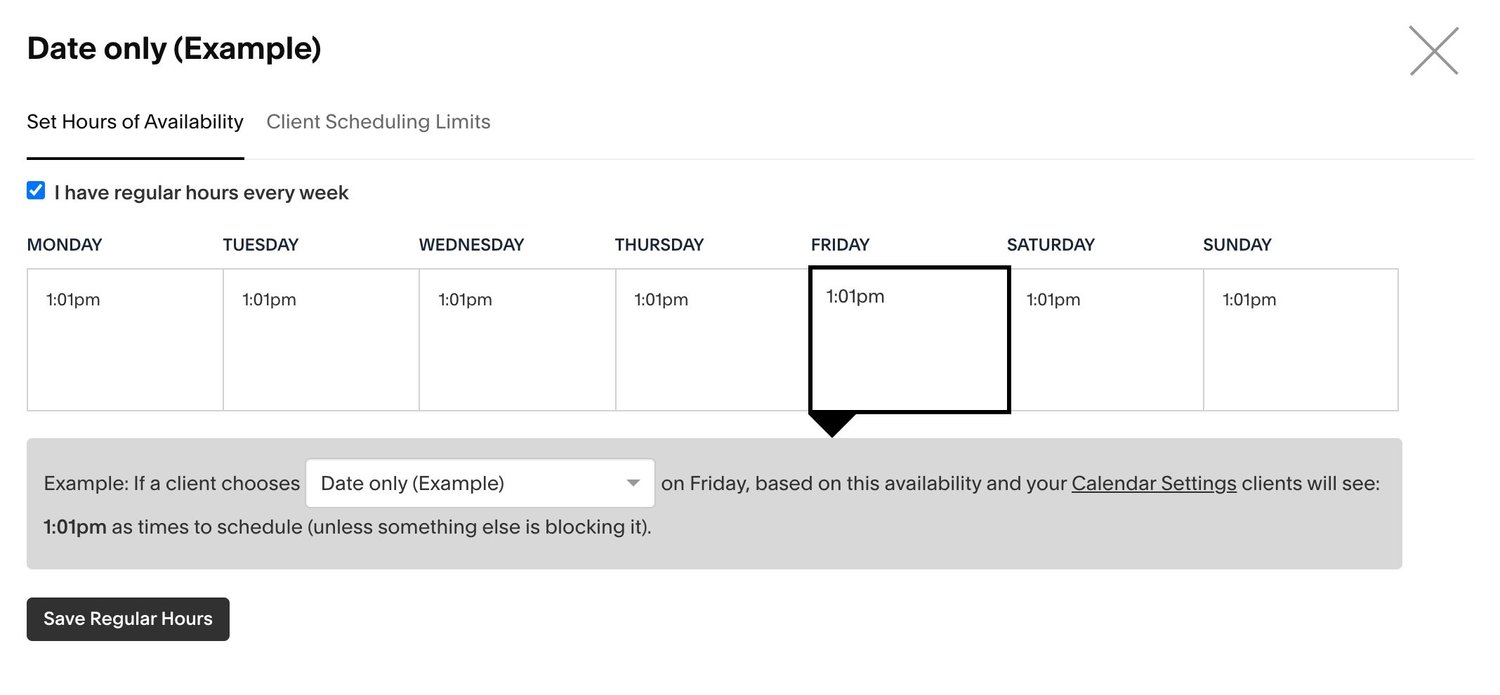
- Go to availability and set it up like this. Only one time that ends with :01. Not 2:00pm, but for example 2:01
Custom CSS Snippet
Client Email Notification
- Create a new email template
- Add your new day only appointment type to send that email template
- Remove the %time% -fields from template
Need Help?
Wanna hire a pro to this for you? Get in touch